X-ray Absorption Spectroscopy: Plotting Different Measurements#
This notebook demonstrates how to process and visualize multiple X-ray absorption spectroscopy (XAS) scans, including normalization and plotting.
[1]:
import warnings

import matplotlib.pyplot as plt

from daxs.measurements import Xas
from daxs.sources import Hdf5Source
from daxs.utils import resources

warnings.filterwarnings("ignore")
Specify the data mappings used to process XAS data. This includes the incident energy, the signal counter, and the monitor counter for normalization.
[2]:
data_mappings = {
    "x": ".1/measurement/hdh_energy",
    "signal": [".1/measurement/det_dtc_apd"],
    "monitor": ".1/measurement/I02",
}
Create a list to hold the measurements. Loop through the specified scan ranges, create a data source for each range, and instantiate an Xas measurement object. Normalize each measurement to the area and append it to the measurements list.
[3]:
hdf5_filename = resources.getfile("CuCO3_Ka_XANES.h5")
measurements = []
for scan_ids in ("1-4", "5-6"):
    source = Hdf5Source(hdf5_filename, scan_ids, data_mappings=data_mappings)
    measurement = Xas(source)
    measurement.x = measurement.scans.get_common_axis("x", "intersection")
    measurement.normalize(mode="area")
    measurements.append(measurement)
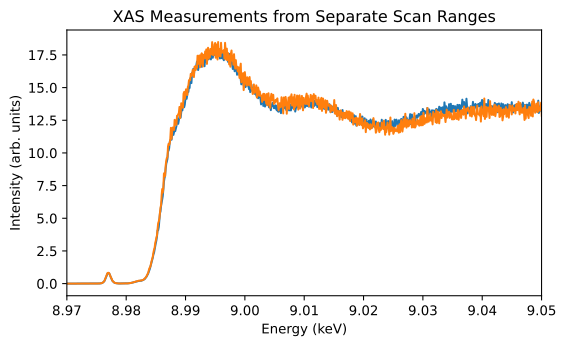
Visualize the processed XAS data by plotting the x and y values of each measurement. Each scan is shifted vertically for better visualization and comparison.
[4]:
fig, ax = plt.subplots(figsize=(6, 3.7))

for i, measurement in enumerate(measurements):
    ax.plot(measurement.x, measurement.signal)

ax.set_xlabel("Energy (keV)")
ax.set_ylabel("Intensity (arb. units)")
ax.set_title("XAS Measurements from Separate Scan Ranges")
ax.set_xlim(8.97, 9.05)

plt.tight_layout()
plt.show()