X-ray Emission Spectroscopy: Outlier Removal and Concentration Correction#
This notebook demonstrates the processing steps for an X-ray emission spectroscopy (XES) measurement, including concentration correction and outlier removal.
[1]:
import logging
import sys

import matplotlib.pyplot as plt

from daxs.measurements import Xes
from daxs.sources import Hdf5Source
from daxs.utils import resources
Configure logging to display console messages during the processing steps, which helps monitor the workflow.
[2]:
logging.basicConfig(level=logging.INFO, stream=sys.stdout)
logging.getLogger("daxs").setLevel(logging.DEBUG)
Specify the source of scans, which in this case is an HDF5 file named P_XES.h5. This file is stored online and downloaded automatically. Also specify the included scans, and the locations of the X-axis, signal, and monitor data within the hierarchical structure of the HDF5 file.
[3]:
data_mappings = {
    "x": ".1/measurement/xes_en_texs",
    "signal": [
        ".1/measurement/g02",
        ".1/measurement/g03",
        ".1/measurement/g04",
        ".1/measurement/g05",
        ".1/measurement/g06",
        ".1/measurement/g07",
        ".1/measurement/g09",
        ".1/measurement/g10",
        ".1/measurement/g11",
        ".1/measurement/g12",
        ".1/measurement/g13",
        ".1/measurement/g14",
    ],
    "monitor": ".1/measurement/I0t",
}

hdf5_filename = resources.getfile("P_XES.h5")
source = Hdf5Source(hdf5_filename, 134, data_mappings=data_mappings)
INFO:silx.utils.ExternalResources:Image P_XES.h5 successfully downloaded.
Create the measurement object using the defined data source. Then, apply concentration correction using data from scan 135 to account for variations in sample concentration across measurement points.
[4]:
measurement = Xes(source)
measurement.concentration_correction(135)
DEBUG:daxs.measurements:The X-axis mapping for the concentration correction scans was updated to elapsed_time.
INFO:daxs.correctors:Applying simple concentration correction.
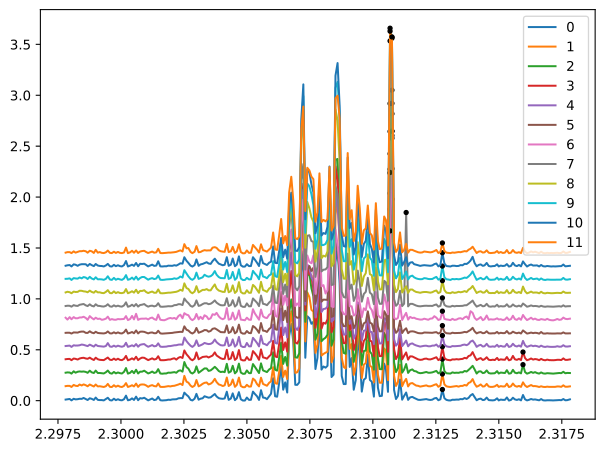
Identify outliers in the signal data by analyzing neighboring points from each counter. Visualize the scan data to observe how the parameters of the find_outliers function affect detection (e.g., adjusting the threshold).
[5]:
measurement.find_outliers(threshold=9)
for scan in measurement.scans:
    fig, ax = plt.subplots()
    scan.plot(ax)
plt.tight_layout()
DEBUG:daxs.filters:Hampel filter window size = 25.
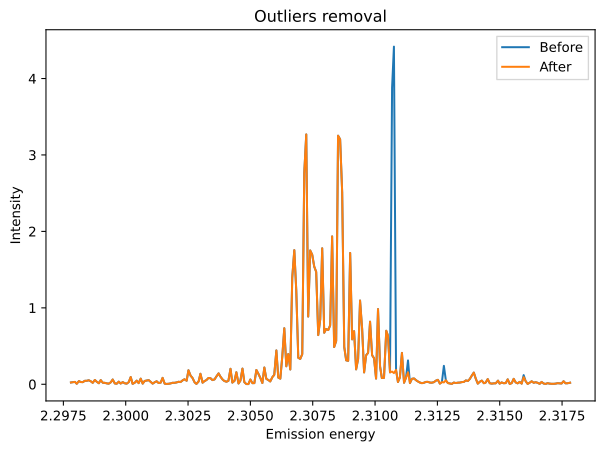
Remove the detected outliers and plot the signal before and after removal to visualize the impact.
[6]:
fig, ax = plt.subplots()

ax.plot(measurement.x, measurement.signal, label="Before")
measurement.remove_outliers()
ax.plot(measurement.x, measurement.signal, label="After")

ax.set_xlabel("Emission energy")
ax.set_ylabel("Intensity")
ax.legend(fancybox=False)
ax.set_title("Outliers removal")

plt.tight_layout()
DEBUG:daxs.scans:The new X-axis values are the same as the current ones in /tmp/daxs_testdata_docs/P_XES.h5/134.
INFO:daxs.measurements:The scans data was aggregated using the fraction of sums mode.
INFO:daxs.measurements:Removing outliers.
INFO:daxs.measurements:The scans data was aggregated using the fraction of sums mode.