X-ray Emission Spectroscopy: Concentration Correction and Plotting#
This notebook demonstrates how to process X-ray emission spectroscopy (XES) data, including correcting for concentration variations, removing outliers, normalizing the data, and visualizing the results.
[1]:
import matplotlib.pyplot as plt

from daxs.measurements import Xes
from daxs.sources import Hdf5Source
from daxs.utils import resources
Specify the data mappings used to locate the XES data. This includes the x-axis (emission energy), the signal counter (here an APD with dead-time correction), and the monitor counter for normalization.
[2]:
hdf5_filename = resources.getfile("A1_Kb_XES.h5")
data_mappings = {
    "x": ".1/measurement/xes_en",
    "signal": ".1/measurement/det_dtc_apd",
    "monitor": ".1/measurement/I02",
}
Set up the source of the data, which in this case is an HDF5 file containing a single scan, scan number 8. The data mappings defined above are applied here.
[3]:
source = Hdf5Source(hdf5_filename, 8, data_mappings=data_mappings)
Instantiate a measurement object from the data source.
[4]:
measurement = Xes(source)
Correct the data for variations in sample concentration. In this example, each scan point was measured at a different position on the sample, leading to concentration differences. The correction data is sourced from scan number 9.
[5]:
conc_corr_scan = 9
measurement.concentration_correction(conc_corr_scan)
Optionally, detect outliers in the data based on a statistical threshold and remove them. The threshold parameter controls the sensitivity of outlier detection (higher values are less sensitive).
[6]:
measurement.find_outliers(threshold=9)
measurement.remove_outliers()
Optionally, normalize the data to facilitate comparison. Supported modes include “area” (normalizes by total area under the curve) or “maximum” (normalizes by the peak value).
[7]:
measurement.normalize(mode="area")
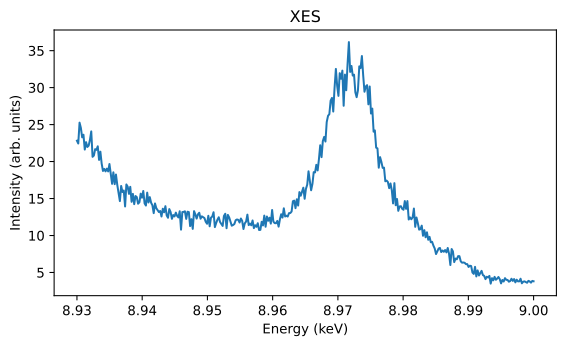
Visualize the processed XES data using the built-in plotting functionality. Retrieve the axis object for further customization, such as setting labels and titles.
[8]:
ax = measurement.plot()

ax.set_xlabel("Energy (keV)")
ax.set_ylabel("Intensity (arb. units)")
ax.set_title("XES")

plt.tight_layout()
plt.show()